
Plan mode
Have the agent research and lay out a reviewable plan before it builds anything, then approve it and watch it run.
Most of the time the agent works step by step, writing and running cells as it goes. Plan mode is for the bigger jobs, where you'd rather see the whole approach laid out and sign off on it before any code gets written.
Nothing reaches your notebook until you approve. The agent drafts a document you can read, argue with, and send back — and only Execute turns its steps into cells.Turning it on
There's a Plan toggle in the chat composer, next to where you type (the workflow glyph). Flip it on and your next message asks Clusy to research the problem and draft a plan first, instead of jumping straight to cells. Flip it back off and the agent goes back to building as it goes.
Plan, then build, then run
With Plan mode on, a request moves through three stages:
- Plan. The agent researches the task and writes a plan document: a short summary, the datasets and any reference papers it found, an ordered list of steps, and a flow chart of the cells it intends to create. Nothing is written to your notebook yet.
- Build. Once you approve, the agent creates the cells the plan describes, in order.
- Run. It executes them, and you watch the results come in.
The plan document opens in its own canvas tab. A compact card in the chat column tracks the live stage and links straight to it. The badge on that card walks the same path every time: Drafting plan, Ready for review, and then, once you decide, Building cells, Cells built, Running, Complete.
It isn't a straight line, though. Your verdict at review decides where it goes, and only one of the four choices below walks the whole path: Execute. Revise sends the plan back to drafting and around for another review, as many times as you want. Build only stops once the cells exist and never reaches Running. Discard ends at Cancelled.
Nothing runs until you decide: Execute builds the cells and runs them, Build only stops once they exist, Revise sends the plan back for another review, and Discard cancels it — and while it runs, the flow chart tracks every cell, failures included.Reviewing the plan
While the plan is Ready for review, nothing runs until you decide. The flow chart is interactive: drag to pan, scroll to zoom, and click any node to read its description and a short code sketch. You can leave notes on individual steps.
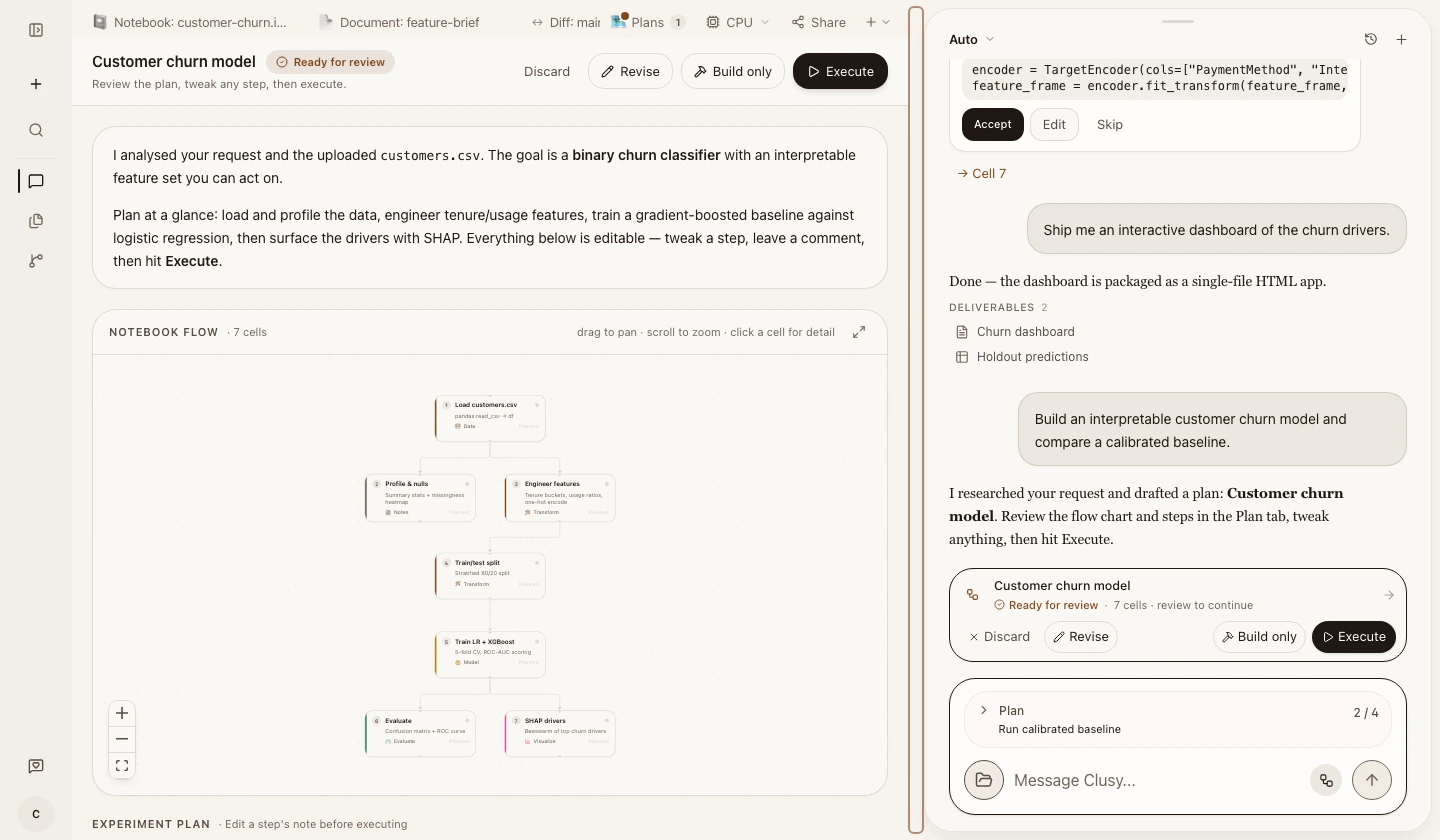 A real plan at review: the editable notebook flow is open in the canvas, with the same decision controls available in the plan header and the Auto conversation.
When you're ready, the header gives you four choices:
- Execute builds the cells and runs them.
- Build only creates the cells but stops short of running them, so you can look before anything executes.
- Revise lets you write what should change, like "add a class-imbalance step" or "drop that reference," and the agent re-plans and comes back for another review.
- Discard throws the plan away.
The same four buttons appear on the plan card in chat, so you don't have to switch to the canvas to decide. You can even answer in plain text: a simple "go ahead" or "looks good" counts as approval, and anything more specific ("go ahead, but add a validation split") is treated as a revision request.
Watching it run
After you approve, the stage badge moves through Building cells, Cells built, Running, and finally Complete. The flow chart lights up as it goes, node by node, with each node tracking the cell it stands for, so you can see at a glance what's done, what's running, and what failed.
A failed node doesn't stop the plan. The plan closes once every node has finished, whether it completed or errored, so a Complete badge can sit above a chart with an amber node still in it. Read the chart, not just the badge.
When it finishes, the plan card in chat reads all steps completed, and the agent reports back on what came out, next to the notebook that produced it:
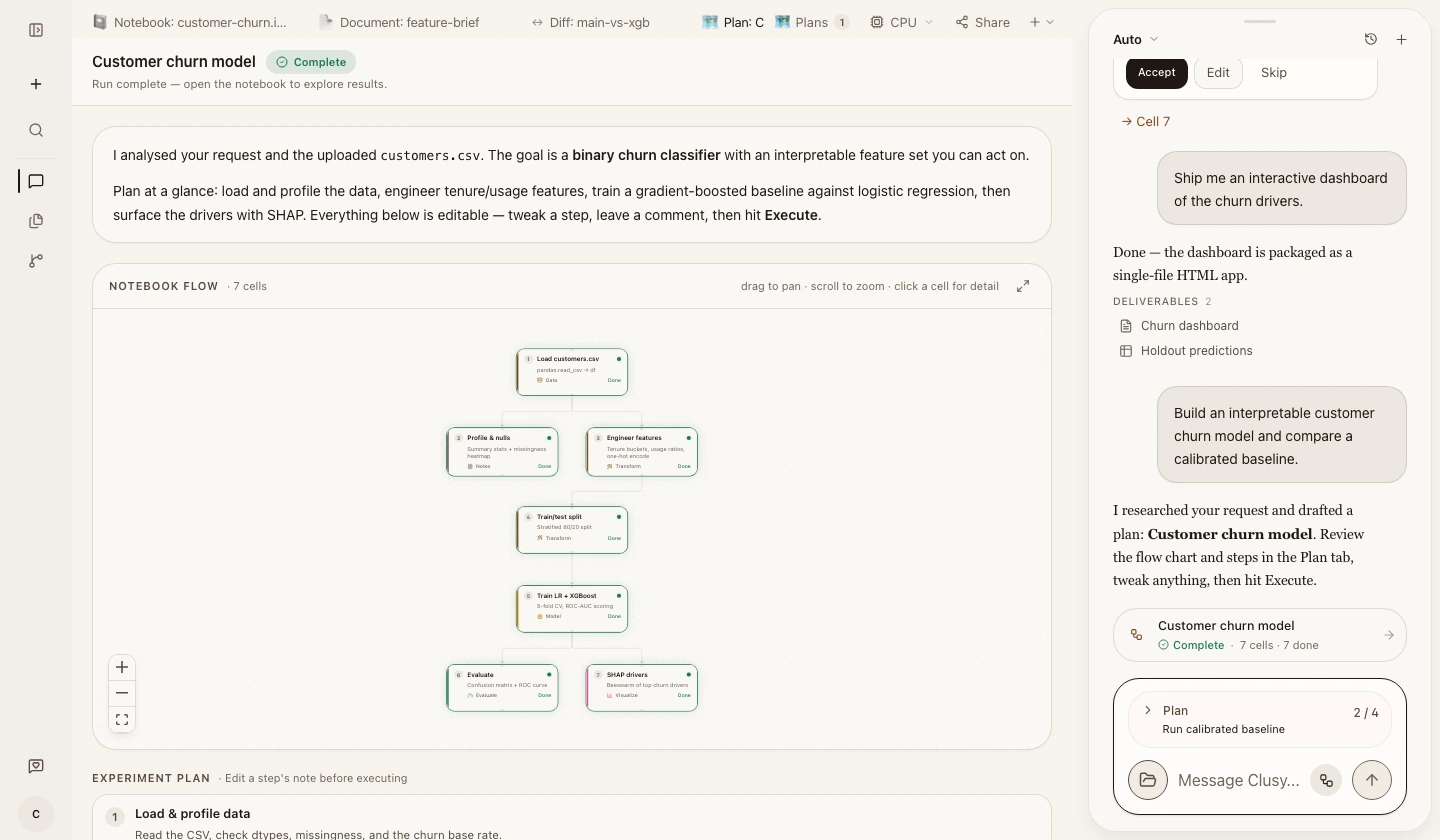 The same plan after the product's Build and Run flow completes: every node is Done, and the canvas and conversation agree on the final state.
The plan is shared
A plan belongs to the project, not to one chat. It's visible from every session, and it sticks around across reloads. While one session is building a plan, it holds onto the work so two sessions don't run the same plan at once. If that session stops responding partway through, the plan shows as stalled and another session can pick it up with Resume build.
When to reach for it
Use Plan mode when the task is large, or when you want a say in the approach before any code lands, like a multi-step modeling pipeline. For quick, obvious work, leave it off and let the agent build as it goes.